For game masters of science-fiction campaigns

A whole galaxy,
one seed away.

Estrelas builds an endless, explorable star map for your campaign: nebulae and star systems, every planet and moon in them, whole worlds with climates, cities, traffic and spaceports. Then it hands your players exactly the parts you choose to share.

Free for macOS, Windows and Linux.

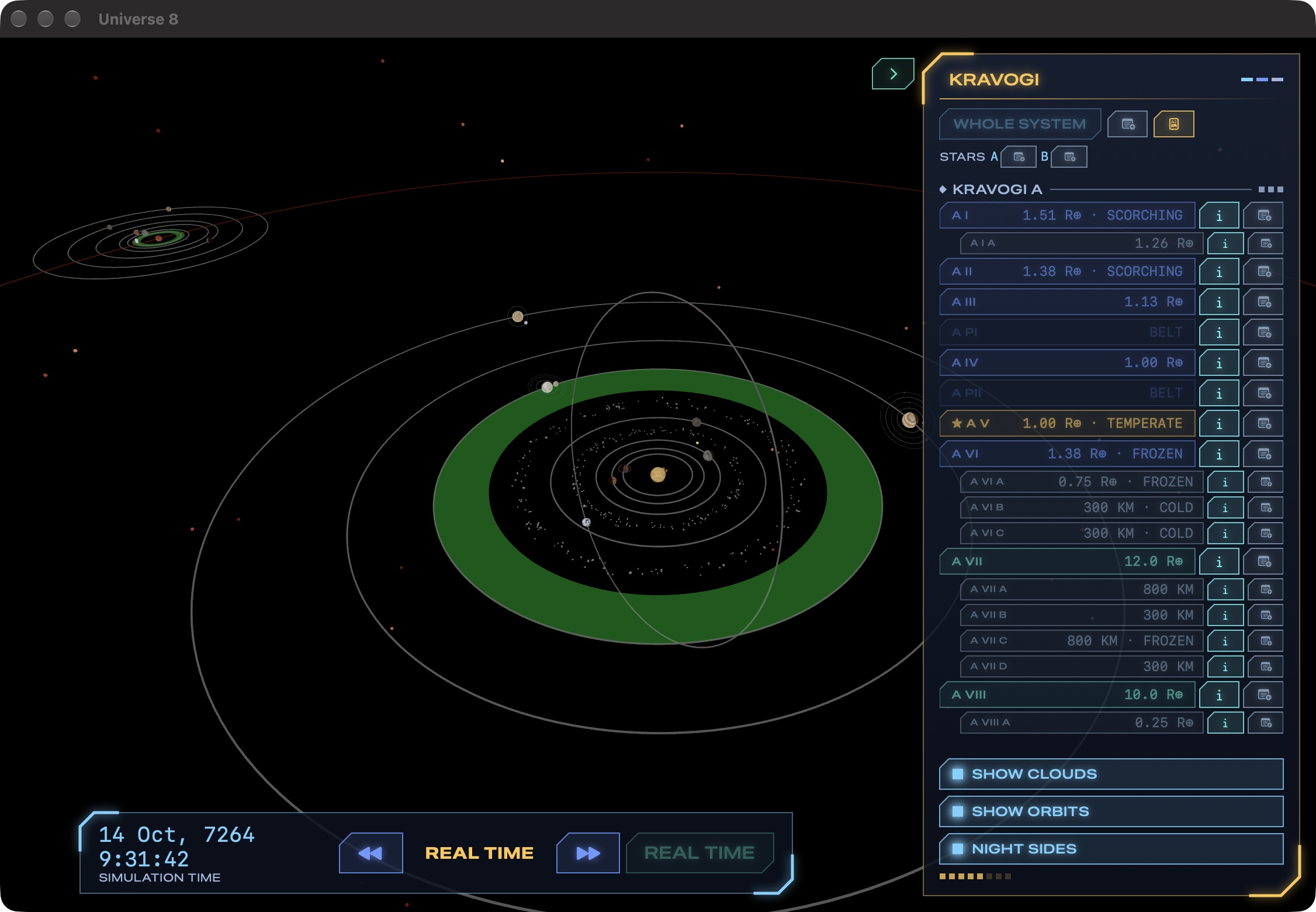
The Estrelas planetary view of the binary system Kravogi: orbits around the main star with a green habitable zone and an asteroid belt, the companion star's own system in the distance, the list of planets and moons beside it, and the simulation clock below

The binary Kravogi system: eight planets and their moons around its main star, with the habitable zone in green.

Everything a game master needs between the stars

Generate a universe in seconds, explore it in 3D, and keep every name, note and change you make. All of it is generated once, saved, and never shifts under you.

Endless star map

Fly in any direction and new sectors appear ahead of you, generated from your universe's seed. Every sector is saved, so the same seed always gives the same galaxy.

Every kind of star, and nebulae

Red dwarfs to blue supergiants and hypergiants, brown dwarfs, white dwarfs, Wolf–Rayet and carbon stars, pulsars, magnetars and black holes, with variable and newborn stars among them. Glowing star-forming clouds, dark nebulae, planetary nebulae and supernova remnants drift between them.

Full planetary systems

Single, binary and multiple stars, with planets, belts, gas giants and moons, each in an orbit that makes sense for its stars. Moons are drawn in proportion, so a giant moon looks the part.

Living worlds

Every planet turns on its own tilted axis, with day lengths, tidal locks and backwards-spinning worlds. Night falls across the globe and city lights come on, while ships, aircraft and spacecraft come and go, and starships flash in and out of the system.

Routes

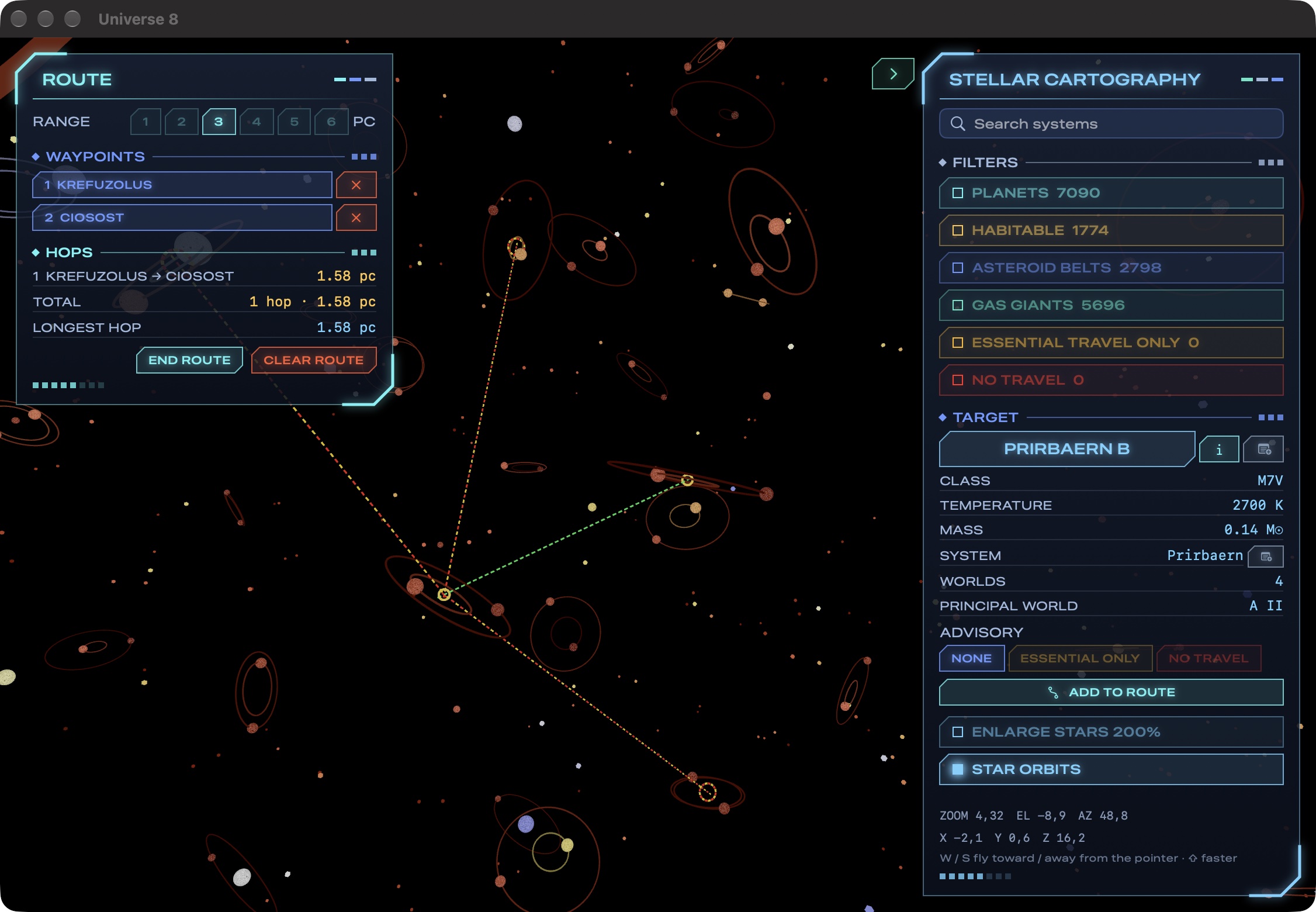
Pick your waypoints and set your ship's range in parsecs; Estrelas plots the route star by star and draws it across the map.

Your universe, your notes

Rename stars and worlds, set spaceports, mark cities on the map and write notes anywhere. Notes are private until you choose to share them.

Cities that fit their land

Settle a world in one click: cities and towns where people would build them, on coasts and rivers, ringed by farmland. Each one opens as a city map built for its terrain, climate and technology.

Print, fold, 3D-print

Export maps as images or PDFs, in colour or as topographic contour maps for the printer, flat or as a fold-up icosahedral world. Export the globe itself as a 3D model, ready for a 3D printer.

Open data

Every universe is a folder of plain, documented JSON. Copy it, back it up, or read it from your own tools and web pages.
A galaxy that goes on as far as you fly

Your universe starts as one sector of a hundred to three hundred systems and grows as you explore.

  • Sectors stream in ahead of you as you fly, nearest first, and drop away behind.
  • Smooth however far it reaches. Nearby stars are drawn in full, glowing and flaring; distant ones as points of light.
  • Nebulae glow among the stars: star-forming clouds lit by young stars, dark dust clouds, and the shells and wrecks of dying stars.
  • Filters, folded into a drop-down, pick out systems with planets, habitable worlds, belts and gas giants, the ones you've marked as dangerous, or the ones you've written notes on.
  • Search by name and fly straight to any system you've visited.
  • Keep the view clear by hiding orbit paths, habitable zones or the orbits of multiple stars with a click.
The Estrelas star map with a route planned between two systems at a range of 3 parsecs, red and yellow rings marking the systems in reach of the last waypoint, and the Stellar Cartography panel with filters and the selected star's data

Every world, profiled

Every inhabited world comes with a country profile like an almanac's: its geography, people and society, government, economy, transportation, and military and security.

  • Real figures throughout: area in square kilometres, population growth and median age, languages and religions, GDP and GDP per capita, GDP by sector, industries and exports, the Gini index, literacy and military spending.
  • Edit in plain language. Step a world's size, mass, air and pressure, water, population, government type, elections, firearms laws or technology base, and the rest of its profile follows. Change its size and its mass follows, keeping its gravity.
  • Print a data sheet with the world's map for the table.
The profile of an inhabited world: population and technology base; its geography; people and society; government type, legal system, elections and judiciary; its economy with GDP, sectors, industries and exports; transportation; and military and security

Planets that hold together

Behind every world is the physics to match, worked out from its star and its orbit.

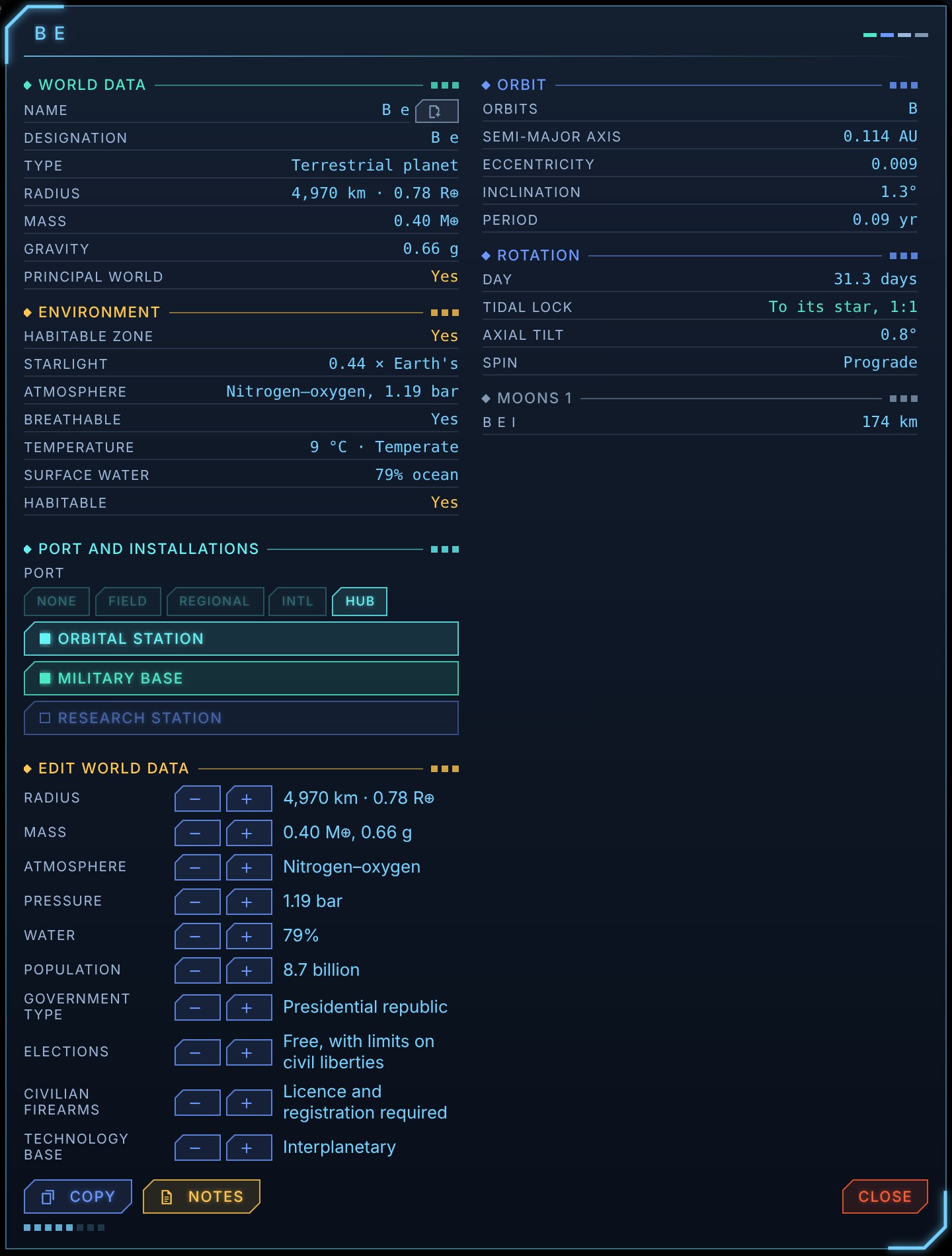
  • Size, mass and gravity, with the starlight it gets, its air and whether you can breathe it, its temperature and its water.
  • Orbit and rotation: distance, eccentricity, inclination and year, day length and axial tilt, retrograde spins included.
  • Ports and installations set with a click: from bare landing field to hub, with orbital stations, military bases and research stations.
The world data sheet for a temperate world: radius, mass and gravity, its environment and atmosphere, its orbit and rotation, the port and installations editor, and the world data editor

Worlds you can stand on

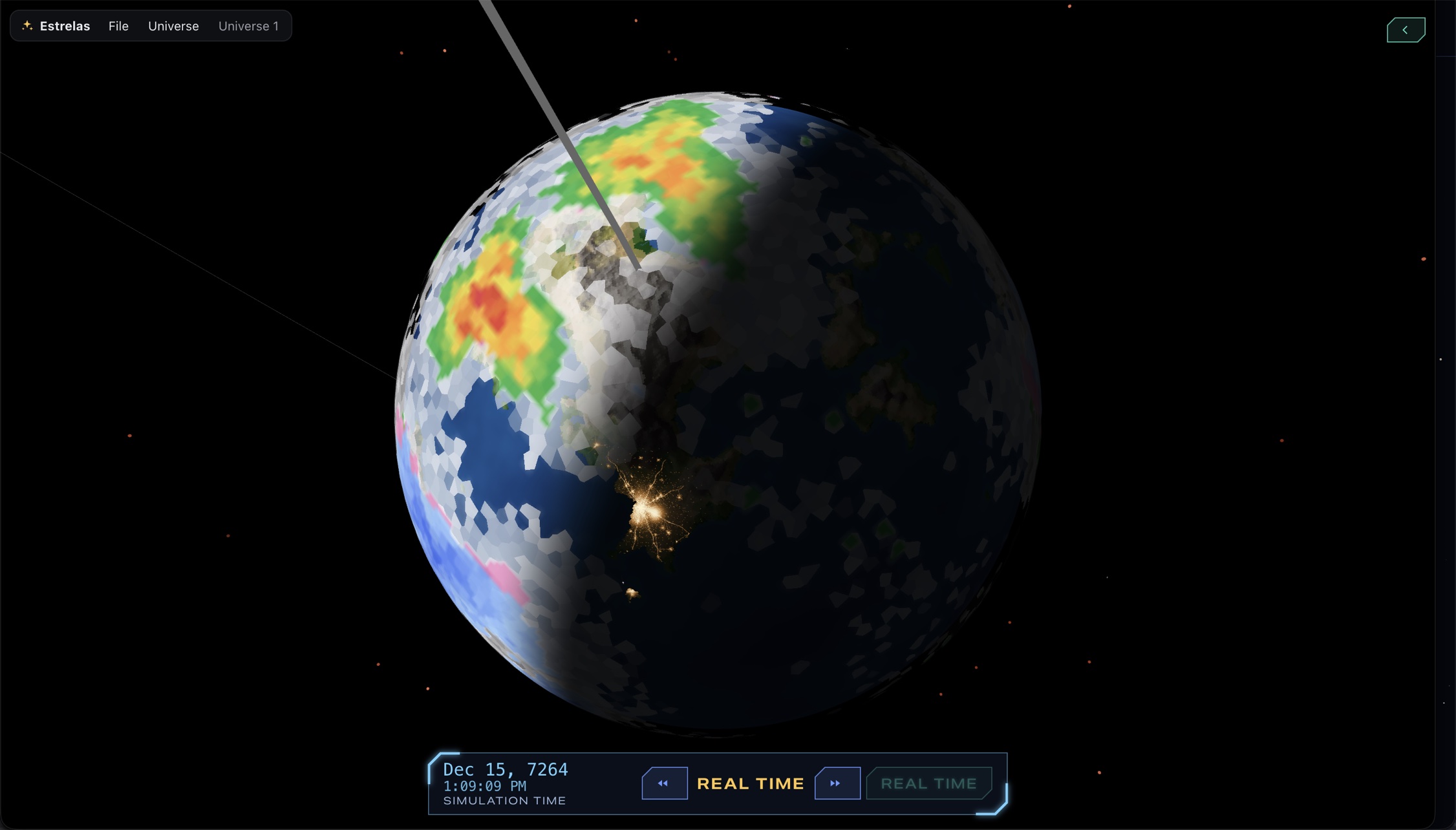
Zoom from the star map to a single planet and it fills the screen: continents, oceans, ice caps, weather and clouds.

  • Climate and biomes from each world's temperature and rainfall, with rivers, lakes and relief.
  • Time controls run the system forward or back, from real time to a year a second, while the camera stays on your world and tucks in beside your data.
A temperate world seen close up: blue oceans and continents under white clouds, with the precipitation radar showing rain in green, yellow and red, city lights glowing across the night side, and the simulation clock below

Maps you can mark

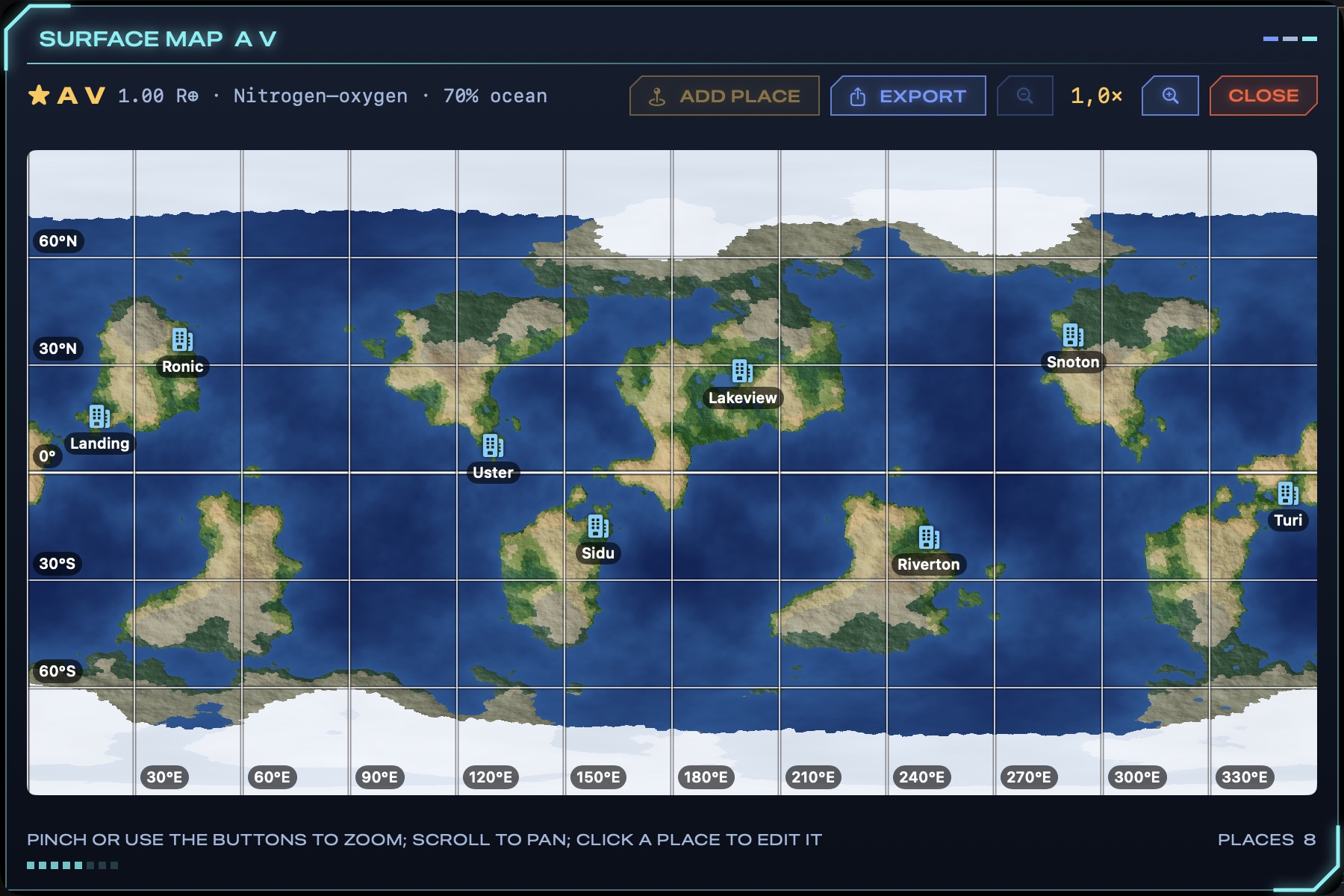
Every world unrolls into a detailed surface map, ready for your campaign's places.

  • Settle the world in one click, with as many cities as its people call for and two or three times as many towns, or mark cities, towns and ports anywhere by hand.
  • Zoom in close with a latitude and longitude grid to keep your bearings.
  • Export the map as an image, or as a PDF with the world's data below it, flat or as a fold-up icosahedral globe.
The surface map of a temperate world: continents, oceans and polar ice on a latitude and longitude grid, with eight cities marked

Cities built for their ground

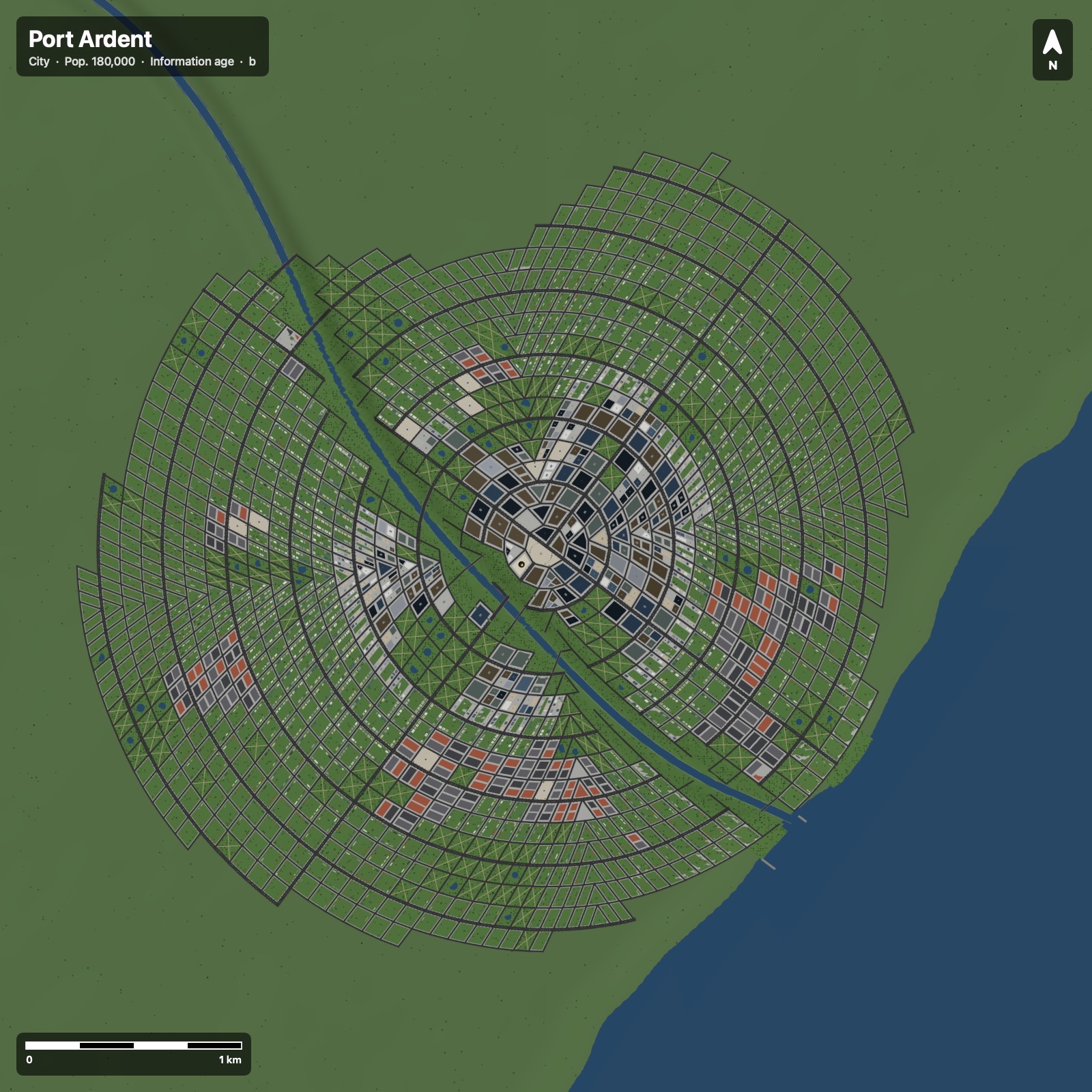
Open any settlement and Estrelas lays it out street by street, from what surrounds it on its world.

  • The land decides: coasts, rivers and lakes, hills and woods shape where the streets run and where the harbour goes.
  • Built by its people: technology sets how tall it grows, and climate how it's built, in desert, temperate, tropical or cold-country styles, until high technology builds the same towers anywhere.
  • Your call: choose the architecture, the street plan and the look for a whole world or a single city.
  • Farmland round it, in fields that follow the land, with terraces in the hills, and lights by night that match its streets.
  • Export a city map as an image or PDF, with a scale bar and compass.
An exported top-down city map of Port Ardent, a city of 180,000: ring roads and radial avenues around a dense centre, cut by a river that runs down to the sea, with a scale bar and north arrow

Maps made for paper

Print a world the way a surveyor would draw it, and spend your ink on the land rather than a black page.

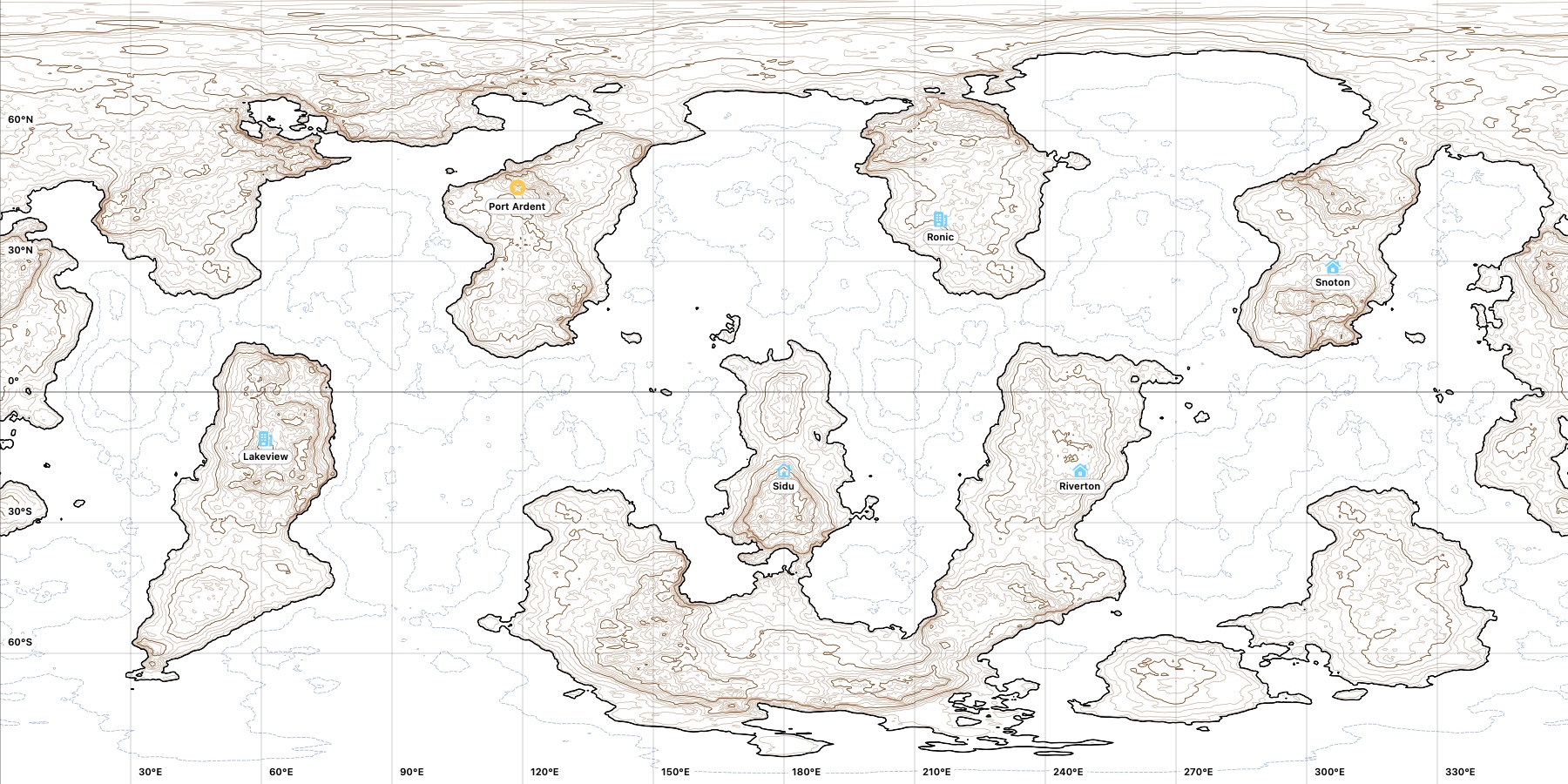
  • Topographic outline maps: contour lines over the land, every fifth one bolder, dashed depth contours at sea, and the coastline drawn heavy and clear.
  • Fold-up globes: export any world as an icosahedral net with its hex grid, to cut out and fold, or to play on hex by hex.
  • 3D prints: export the globe as an STL model with its relief, on a stand or with a loop to hang it by.
A topographic outline map of a world: brown contour lines over its continents, dashed blue depth contours at sea, bold coastlines, a latitude and longitude grid, and six settlements marked

One universe. Two editions.

The game master builds the universe. The players explore it, and see only what the GM shares.

Estrelas

For the game master

The full toolkit for building and running your campaign's universe.

  • Create as many universes as you like, each from its own seed
  • Rename, annotate and edit stars, worlds and moons, all in plain language
  • Put travel advisories on dangerous systems (or hide them, if your setting has none), and set spaceports and bases
  • Write private notes, and share the ones players should see
  • Export a universe for your players as a single file
Estrelas Player

For the players

The same star map, read-only, with nothing the GM hasn't revealed.

  • Open the universe your GM sent by AirDrop, email or a shared folder
  • Explore stars, planets and maps in full 3D
  • Read the notes the GM has shared, and no others
  • Plot routes for the ship
  • Includes a universe of its own to explore straight away

From seed to session in minutes

No spreadsheets, no dice tables open on the table. Just a universe ready to play.

Pick a seed

Name your universe and roll a seed, or type one in to share a universe with another GM.

Explore and shape

Fly the map, open systems, zoom to worlds. Rename, note and edit whatever the story needs.

Share with players

Export for players and send the file. Only the notes you've shared go with it.

Play

Plot the route, open the world's data sheet, and let your players see where they've landed.

Your players are waiting at the spaceport.

Free for macOS, Windows and Linux. Each download has both Estrelas and Estrelas Player. Pick a seed and start charting.

Public signing key

No download needed: the app loads from this site and runs entirely in your browser, on your own computer. Run this way, a few things differ from the downloads above:

  • TravellerMap's world maps can't be imported (sector data still is), so Traveller worlds get generated surfaces instead of their published maps.
  • Universes are kept in this browser only, apart from the downloaded app's. Clearing site data removes them, and Safari may remove them after a few weeks unused, so keep copies (File ▸ Save Universe As…).
  • It needs an internet connection to start.
  • Safari and Firefox save and open universes as .zip files rather than folders.

In English, Português, Español, Deutsch and Français. Two interface styles: Estrela and macOS.

Questions, bugs or ideas?

Found a problem, want a feature, or just want to tell us about your campaign? We'd love to hear from you.